You can now redesign your entire yard from a single phone photo before you buy a single plant, pour a foot of concrete, or call a contractor. AI landscaping tools turn a picture of your front or back yard into a photorealistic redesign in about 30 seconds, so you can test layouts, plant palettes, and hardscaping on screen instead of learning what works the expensive way. This guide covers how the technology works, what it does well, where it stops, and how to use it to plan a whole property, not just one flower bed.
What does AI landscape design actually do?
AI landscape design takes a photo of your real yard and generates a new version of that same space with different plants, materials, and layouts, keeping your house, fences, and property lines intact. It is visualization, not construction. You upload a picture, pick a style, and the tool paints your existing yard as it could look finished.
The practical value is speed and reversibility. Instead of imagining whether a gravel path or a paver walkway suits your entrance, you generate both and look at them side by side. Tools like AI landscape design from GenRoom produce a photorealistic redesign from one photo in roughly 30 seconds, and because nothing is physical yet, changing your mind costs nothing. That single fact quietly removes the biggest source of regret in yard projects.
What it changes for a homeowner:
- Front and back together. You can plan curb appeal and a private backyard retreat in one afternoon, not two separate consultations.
- Materials on your actual house. See flagstone, decking, mulch, or lawn against your real siding and light, not a generic stock photo.
- Plant palettes at maturity. Preview how layered beds, ornamental grasses, or a cottage border read against your fence line.
- A shared reference. Walk into a nursery or a contractor meeting with an image instead of a vague description.
How do you reimagine a whole yard, front and back?
Work zone by zone and generate several options per zone, then combine the winners into a plan. A yard is not one decision; it is a stack of them, and AI lets you resolve each one visually before committing.
A repeatable workflow:
- Photograph each zone in daylight. Front entrance, driveway edge, side yard, back patio, and the lawn. Steady, straight-on shots work best.
- Set the goal per zone. Curb appeal at the front, low-maintenance planting on the side, an entertaining patio in back.
- Generate 3 to 5 variations. Try different styles on the same photo so you are comparing your yard against itself.
- Refine the keeper. Swap a plant, widen a path, or change paving with an editing pass rather than starting over.
- Assemble a look book. Save one strong image per zone. That set becomes your budget and shopping guide.
Quotable: Design the whole property on screen first, and the yard you build is the third or fourth draft, not the first guess.
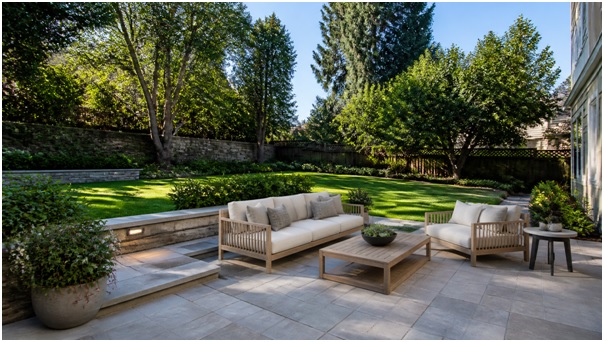
A backyard concept: lawn, mature trees, and a paver patio sized for real furniture before any construction begins.
Which tool features matter for landscaping?
The features that matter most are outdoor-specific redesign, a broad style library, editing control, and high resolution for sharing. A tool built only for interiors will struggle with plants, paving, and natural light.
| Feature | Why it matters for yards |
| Outdoor / landscaping mode | Handles plants, lawn, paths, and fences, not just walls and floors |
| 50+ styles | Test modern, cottage, xeriscape, or classic looks on one photo |
| AI Editor | Change a single element (path, bed, tree) without regenerating everything |
| Pro Model & 4K | Sharper, more believable output you can hand to a contractor |
| Up to 5 photos | Cover front, back, and side zones in one session |
GenRoom bundles these for interiors, facades, yards, and virtual staging, with free starter credits to test before paying. Paid plans run Start at $6.99, Basic at $19.99, and Pro at $29.99, so a full multi-zone yard exploration costs less than a single bag of premium soil.
Where does AI stop and a real landscaper begin?
AI is for visualization and planning; it does not replace a professional for structural, technical, or code-bound work. Treat the images as a design brief, not a build spec. Anything that holds weight, moves water, or carries a permit still needs a human expert.
Draw the line clearly:
- AI handles well: style direction, plant palettes, bed shapes, path and patio placement, before-and-after comparisons, curb-appeal ideas.
- Leave to professionals: grading and drainage, retaining walls, irrigation systems, tree removal near structures, electrical, and anything requiring a permit or engineering.
- Verify with local reality: plant hardiness for your zone, mature sizes, sun and shade, soil, and HOA rules.
Quotable: AI gives you the picture; a landscaper makes sure the picture drains, stands up, and passes inspection.
How much money and time does this save?
It mainly saves you from paying for the wrong project. Professional landscape design plans often run hundreds to a few thousand dollars, and rework after installation is far costlier. Generating a dozen visual options up front narrows your choices before any of those bills start.
Where the savings land:
- Fewer design revisions. You arrive at a consultation with a direction already chosen.
- Smarter shopping. A clear image reduces impulse plant buys that die or crowd.
- Better contractor quotes. Specific visuals get you accurate, comparable bids instead of guesses.
- Fewer redo costs. Testing a patio size on screen beats discovering it is too small after the pavers are set.
The biggest hidden saving is time. A traditional design loop, sketch, review, revise, can take weeks of back-and-forth. Generating and comparing options in an afternoon compresses that into a single sitting, and you keep every version, so you can revisit a rejected idea later instead of trying to redraw it from memory.
Quotable: The cheapest place to make a landscaping mistake is on a screen, where fixing it costs one more render.
The Bottom Line
AI landscape design turns yard planning from a series of expensive guesses into a fast, visual, low-risk process. Photograph each zone, generate options, refine the keepers, and walk into any nursery or contractor meeting with a clear picture of the finished space. Let the AI handle the imagination and comparison; let a professional handle grading, drainage, and anything structural. Do both, and you reimagine your whole property, front and back, before spending a dollar on plants or pavers.
Frequently asked questions
Do I need any design skill to use it?
No. If you can take a photo and tap a style, you can generate a redesign. The tool does the rendering; you make the choices.
Will the redesign match my actual house?
Yes. Because it works from your own photo, the output keeps your house, fences, and layout, and shows new plants and materials against your real setting.
Can I plan front and back yards in one session?
Yes. With support for up to 5 photos, you can cover the front entrance, side yard, and backyard together and build one combined look book.
Is it free to try?
GenRoom offers free starter credits, with paid plans from $6.99. That is enough to test several zones before deciding whether to upgrade.
Can I give the images to my landscaper?
Yes, and you should. High-resolution 4K exports make a clear visual brief that helps professionals quote and build what you actually want.